
Some index.dat files record not only websites visited, but also the files on the computer (and any other devices) which have been opened. This gives an accurate account of what files have been viewed and possibly edited. Using the registry, any files accessed that are not on the C: drive can be linked to a USB stick / DVD / CD etc.
Webscavator, my visualisation application to forensically analyse web history, shows the files accessed (and the number of times accessed) by drive letter and then by file type in a simple vertical tree. Part of my own file history can be seen in the image below.#
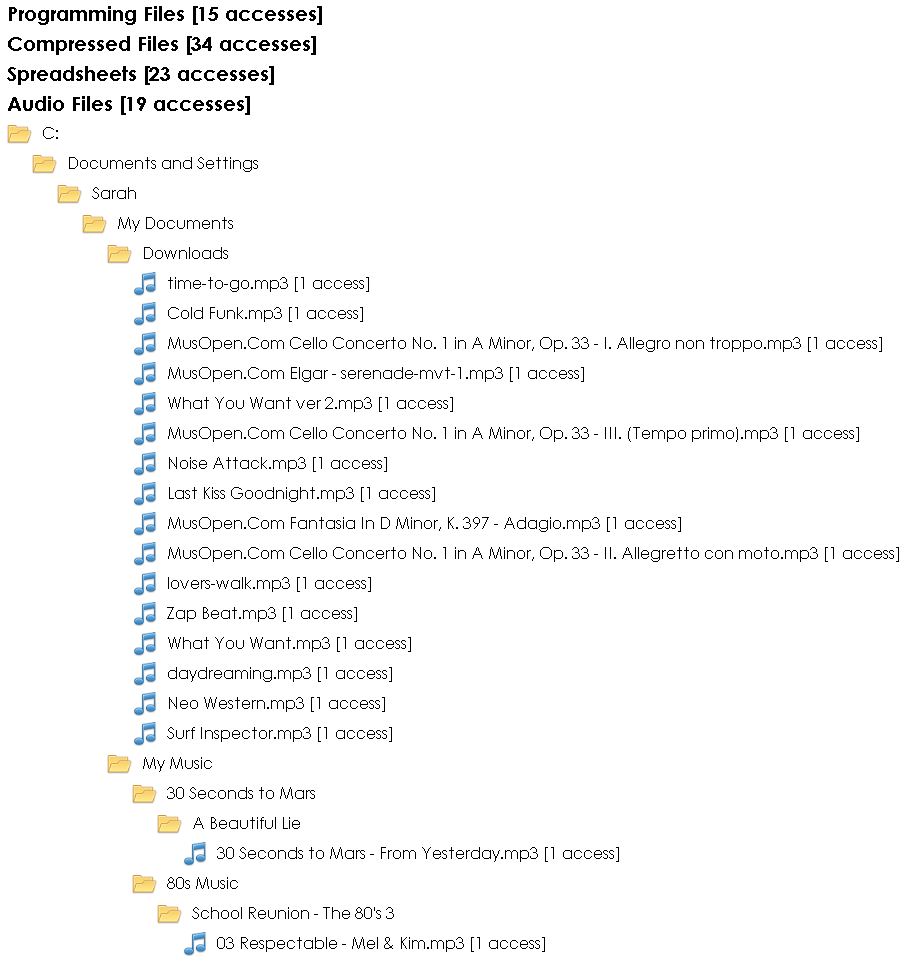
Showing the files in a tree like structure makes it easier to see patterns and the relationships of the file locations. In the example above, you can see I put downloaded music in My Documents/Downloads and organise my other music in My Music. I haven’t put the access date or time on the visualisation because a lot of files may have multiple accesses, and the multiple dates and times would make the structure messy. It is easy to create a filter in my other visualisations to find the date and time of the accesses, or to use the program that retrieved the index.dat data in the first place. Webscavator is intended to be used alongside other programs, not to replace them.
This is the python code that generates the tree structure:
@staticmethod
def buildTree(tree, element):
"""
    Builds a tree of the folder structure
"""
    path, count = element # the full path of the file and numbr of acceses
    current = tree
    parts = path.split('/') # split the path into the folders
    for part in parts[:-1]:
        current = current.setdefault(part, {}) # traverse tree adding folders
    current[parts[-1]] = count # last element of tree is the number of accesses

@staticmethod
def filesAccessed():
"""
    Returns a tree of the folder structure for each drive and the total number of
    files accessed
"""
    # filter by the URL.scheme being a file and group by the URL.path to count the number of
    # accesses
    q = session.query(URL, func.count(1)).filter(URL.scheme == "file").order_by(func.count(1))
    q = q.group_by(URL.path)

    total = q.count()
    drives = {}

    # for each path, number of accesses in the query, build up the tree
    for file, count in q:
        path = urllib.unquote(file.path[1:])

        if path[1] == ":":  # i.e. lookes like C:/, D:/ etc
            drive = path[0]
        else:
            continue # don't deal with Unix
        ending = path.rsplit('.',1) # find the extension

        # FILE_TYPES is a dictionary of extensions and the file type the extension belongs to
        # 'other file' is the default if the extension is not in FILE_TYPES
        type = FILE_TYPES.get(ending[-1].strip().lower(),'other file')

        # Add the drive letter to the root of the forest
        if drive not in drives:
            drives[drive] = ({}, 0)

        # add the file types to be the root of the tree
        if type not in drives[drive][0]:
            drives[drive][0][type] = ({}, 0)

        # add the the count for drives and file types
        drives[drive] = (drives[drive][0], drives[drive][1] + count)
        drives[drive][0][type] = (drives[drive][0][type][0], drives[drive][0][type][1] + count)

        # build the tree
        Entry.buildTree(drives[drive][0][type][0], (path, count))

    return drives, total
The Python templating language Mako is used to produce the tree. Once you are inside a drive’s file type, the iter_tree(tree, depth, filetype) function is called recursively to draw the structure.
<%def name="iter_tree(tree, depth, file_type)">

    % for name, children in tree.iteritems():
        % if (isinstance(children, int)):
            ## display the file, end case for recursion
            <p style="margin-left:${depth * 25}px!important;">
                 <img src="images/site/${file_type}.png"  />
                 ${name|h} [${children} accesses]
            </p>
        % else:
            ## display the folder
            <p class="file_struct" style="margin-left:${depth * 25}px!important;">
                 <img src="images/site/folder.png" />
                 ${name|h}
            </p>
            ## recurse

            ${iter_tree(children, depth + 1, file_type)}
        % endif
    % endfor
</%def>

% for drive, (file_types, drive_count) in files_accessed.iteritems():
    <h2><img src="images/site/drive.png" />
        ${drive}:/ Drive [${drive_count} accesses] </h2>

       % for file_type, (tree, count) in file_types.iteritems():
            <h3>${file_type} [${count} accesses]</h3>
            ${iter_tree(tree, 0, file_type)}
        % endfor
% endfor 
 Lowmanio